Specialized Barcode Standards: Code 39, Code 128, ITF-14, MSI & Pharmacode
An engineering selection guide comparing specialized linear symbologies by payload, density, checksum behavior, printing environment, scanner support, business semantics, and migration risk.
1. Why One Barcode Does Not Fit Every Workflow
Retail checkout, warehouse picking, corrugated-case printing and pharmaceutical packaging inspection impose different constraints. Selecting by visual appearance or familiarity usually produces avoidable integration problems.
2. Comparison Matrix
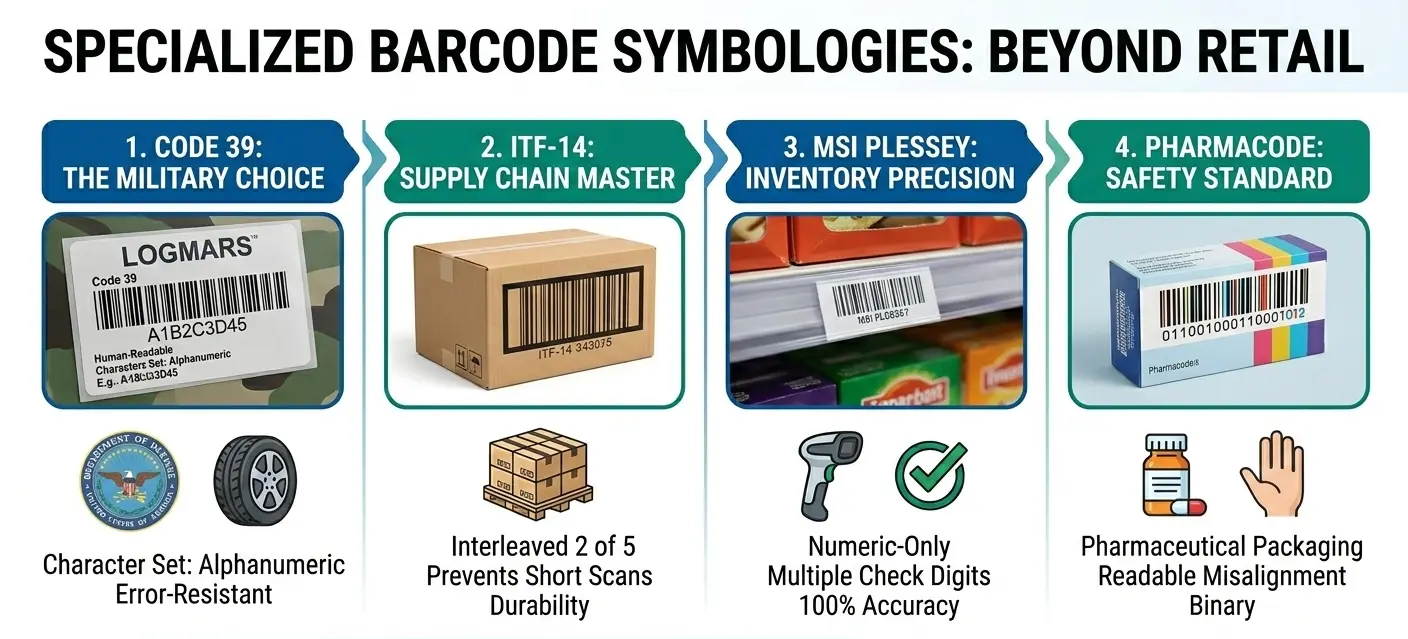
| Symbology | Payload | Validation | Typical Role |
|---|---|---|---|
| Code 39 | Alphanumeric | Optional Mod-43 | Legacy industrial |
| Code 128 | Broad alphanumeric | Mandatory Mod-103 | Dense logistics/internal |
| ITF-14 | GTIN numeric | GTIN check digit | Cases/corrugated |
| MSI | Numeric | Variant-dependent | Legacy inventory |
| Pharmacode | Numeric value | Process-specific | Pharma packaging control |
Once you have selected the appropriate symbology, you can create Code 39, Code 128, ITF-14, MSI, or Pharmacode symbols with our free barcode generator and export them as PNG, JPG, or SVG.
3. Data Semantics vs Symbology
A symbology describes how data is represented optically. It does not automatically define what the data means. Code 128 can carry an internal asset ID, while GS1-128 adds standardized GS1 semantics on top of the Code 128 carrier.
4. Density and Label Space
| Need | Strong Candidate | Reason |
|---|---|---|
| Long mixed text | Code 128 | High density and broad character support. |
| Short legacy uppercase ID | Code 39 | Compatibility. |
| GTIN on rough carton | ITF-14 | Designed for distribution printing. |
| Existing numeric shelf system | MSI | Legacy compatibility. |
5. Checksum Behavior
Checksum handling differs materially: Code 128 mandates Mod-103; Code 39 can add Mod-43; MSI has multiple deployment variants; ITF-14 carries a GTIN with GS1 check digit; Pharmacode validation is tied to production-control logic.
6. Scanner Fleet Compatibility
Before migration, inventory every scanner model and configuration. A symbol supported by hardware may still be disabled in firmware settings or transmitted differently because of checksum/start-stop options.
7. Print Environment
| Environment | Design Pressure |
|---|---|
| Thermal label | Resolution, bar growth, ribbon/media |
| Corrugated | Rough fibres, ink spread |
| Production carton | Line speed, camera lighting |
| Small asset tag | Density and durability |
8. Business-System Integration
9. Migration Without Breaking Identity
If a legacy barcode is replaced, preserve the business identifier when possible. Change the optical carrier and scanner/parser configuration rather than unnecessarily renumbering assets or locations.
10. Selection Questions
Ask: What characters are required? Is the data globally standardized or internal? How much label space exists? What substrate is used? What scanners already exist? Is a checksum required? Does the downstream application expect structured semantics?
11. Decision Summary
| Scenario | Recommended Direction |
|---|---|
| New dense internal ID | Evaluate Code 128 |
| Established Code 39 plant | Keep or migrate after compatibility study |
| Corrugated GTIN case | ITF-14 where applicable |
| Legacy MSI inventory | Document variant before migration |
| Pharma packaging component check | Pharmacode where specified |
12. Symbology Selection as Risk Management
Choosing a barcode is partly a risk decision: what happens if a scan fails, if a value is mistyped before printing, or if an old scanner cannot decode the new carrier? A low-risk internal label can tolerate different trade-offs from a pharmaceutical packaging control.
13. Why Migration Projects Fail
Barcode migrations often fail because teams change the printed symbol but forget parser behavior, scanner settings, label dimensions, operator procedures, or database field rules. Treat migration as a system change with parallel testing rather than a graphic-design update.
14. Documenting a Barcode Interface
A proper interface specification should name the symbology, character set, checksum policy, expected transmitted value, prefix/suffix behavior, minimum/maximum length, physical size, quiet zones, and downstream meaning of the data.
15. Error Cost Should Influence Carrier Choice
If a scan failure only slows an internal stock count, the acceptable risk may be different from a packaging-line mismatch that could affect product quality. Define the consequence of no-read, misread and wrong-data events before choosing a symbology. That makes decisions about checksums, verification, redundancy and migration investment much more rational.
16. Do Not Encode Unnecessary Metadata
Longer payloads make most linear symbols physically larger. Instead of embedding department, location, owner and status into every identifier, consider encoding a stable key and retrieving changeable metadata from the application database. This keeps labels compact and avoids relabeling when organizational attributes change.
17. How to Write a Symbology Interface Specification
A barcode deployment should have an interface specification just like an API. The document should state the symbology, supported character set, minimum and maximum payload length, checksum policy, start/stop behavior, expected scanner transmission, human-readable format, physical X-dimension or module size, quiet-zone requirements, and the business meaning of the decoded value. Without this document, equipment replacements often expose assumptions that were never written down.
For example, a factory may say it 'uses Code 39,' but one scanner is configured for Full ASCII, another validates Mod-43, and the application expects the asterisks to be stripped. A new scanner using default settings can therefore decode the bars correctly yet send a string the application rejects. Similar issues appear with MSI checksum transmission, Code 128 FNC handling, or GS1-128 Application Identifier parsing.
The specification should also define failure behavior. Decide what happens on no-read, checksum failure, unknown identifier, duplicate identifier, and application timeout. This turns barcode selection from a graphic choice into an engineered interface. It also makes future migration safer because the organization knows exactly which behaviors must be reproduced or deliberately changed.
Related Guides
Continue with closely related technical references.